
Culver’s Gift Cards 2026: Buy, Check Balance, E-Gift Cards & More
A Culver’s gift card fixes that in about three minutes. Pick a design, choose an amount, type an email, and the card lands in their inbox before you’ve finished feeling bad about it. If you’re searching for Culver’s gift certificates, a Culver’s gift card is the simple option for birthdays, holidays, or a quick surprise. They’re one of those rare gifts that almost nobody turns down, and the card has a feature most gift cards don’t: it never expires. This guide covers everything from buying and sending a card to checking your balance, using it at Culver’s, and knowing what to do if something goes wrong. Rules and availability can change, so check the official Culver’s gift card page before you buy.
Culver’s Gift Cards at a Glance
| Question | Quick Answer |
|---|---|
| Where can you buy them? | Online (digital) or at a Culver’s restaurant (physical) |
| Are e-gift cards available? | Yes, delivered by email, and you can schedule the delivery |
| How do you check the balance? | Through the official online balance checker |
| Can you use them online? | Yes, with the card number and PIN at checkout |
| Can you use them in the app? | Yes, same number and PIN |
| Can you reload them? | Yes, anytime, digital or physical |
| Do they expire? | No, and there are no service fees on unused balances |
| Amount limits | $10 minimum, $250 maximum |
| Where do they work? | Participating Culver’s restaurants and online orders in the U.S. |
| Can you get a refund? | No, purchases are non-refundable and final |
What Are Culver’s Gift Cards?
A Culver’s gift card is a prepaid card you can spend on Culver’s food, custard, and drinks. You load money onto it, and the person holding it can spend it like cash at Culver’s. You don’t need an account to use one, so anyone with the card or the e-gift card email can redeem it. There are two formats available, and each one suits different situations depending on whether you want to give someone a physical card or send a gift digitally.
Physical Culver’s Gift Cards
The plastic card you can hold. According to Culver’s, you can pick one up at your local restaurant, and you can reload an existing card while you’re there.
A physical card is the better pick when you’re handing something over in person. It slips into a birthday card, a thank-you note, or a teacher’s gift bag.
Culver’s E-Gift Cards and Digital Gift Cards
The digital version. You order it online and Culver emails it directly to the recipient, or to you.
You choose the design, set the amount, and pick the day it arrives. That scheduling option is quietly one of its best features, because you can buy a gift today and have it arrive on the morning of the birthday.
Physical or Digital: Which One Should You Choose?
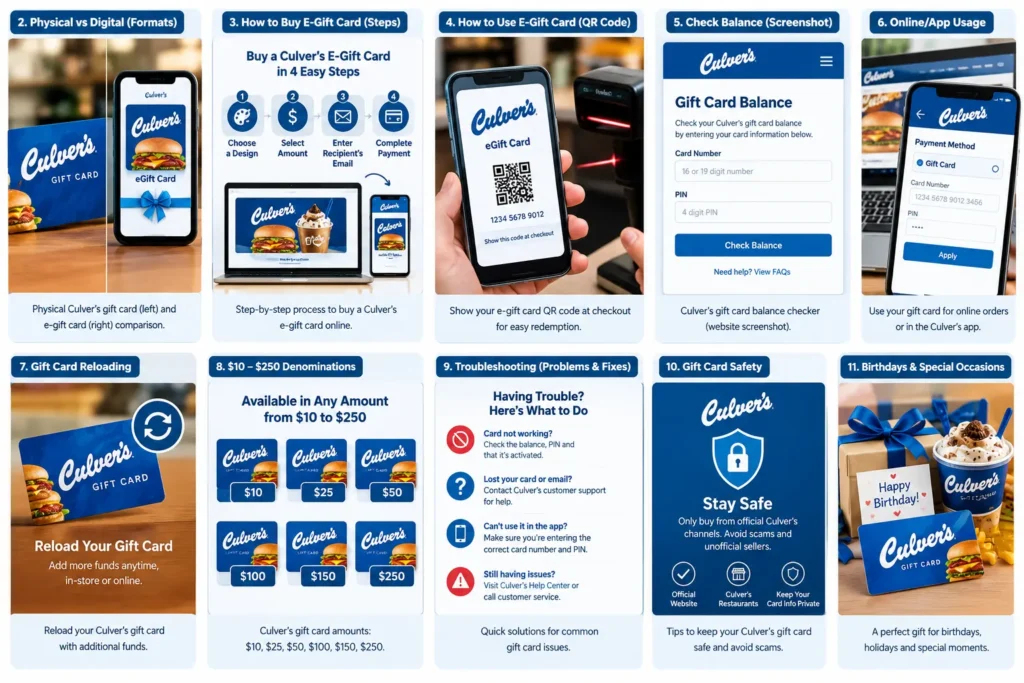
| If you… | Choose |
|---|---|
| Need it in the next ten minutes | Digital |
| Live far from the person | Digital |
| Want to hand it over in person | Digital |
| Want to pay with something other than a credit card | Physical (alternative payment methods are available at restaurants) |
| Want it to arrive on a specific date | Digital |
| Are giving it to someone who prefers not to deal with email | Physical |
Where to Buy Culver’s Gift Cards
You have two official routes. That’s the full list on Culver’s own page, and it’s worth being clear about, because plenty of unofficial sites claim otherwise.

Buy Culver’s Gift Cards at a Restaurant
Walk into any Culver’s and ask at the counter. This is the route for anyone who doesn’t want to pay by credit card, since Culver’s says alternative payment methods are available at its locations.
Buy Culver’s Gift Cards Online
The online store sells digital cards in any amount from $10 to $250. At this time, online gift card purchases are credit card only.
Two rules matter here, and they catch people off guard:
Gift card purchases are non-refundable.
Every transaction is final. You can’t edit the amount or cancel afterward. To give more, you buy a second card.
Double-check the amount and the email address before you hit pay.
Where Can I Buy Culver’s Gift Cards Near Me?
Open the Culver’s restaurant locator and pick the closest location. Hours differ from one restaurant to the next, so check before you drive over. Our Culver’s Hours page can help.
Does Walgreens Sell Culver’s Gift Cards?
Culver’s official gift card page doesn’t list Walgreens. It names only its own restaurants (for physical cards) and its own online store (for digital ones).
Some drugstores and grocery stores carry gift cards from restaurant brands, but stock varies by store and by season. If you want to buy from a retailer, call that store and ask before making a trip.
Can You Buy Culver’s Gift Cards at Walmart?
Same answer. Walmart isn’t listed on Culver’s official page. If a store does carry one, treat the purchase carefully. Check that the packaging is untouched and that the PIN area hasn’t been scratched or peeled.
For the safest purchase, stick with Culver’s restaurants and Culver’s official online store.
Culver’s E-Gift Cards: How Digital Gift Cards Work
Does Culver’s Have E-Gift Cards?
Yes. Culver’s calls them digital gift cards, and they’re ordered online and delivered by email.
How to Buy a Culver’s E-Gift Card
Open the official digital gift card page.
Choose a design.
Enter an amount from $10 to $250.
Add the recipient’s email, or your own.
Pay with a credit card.
How to Send a Culver’s E-Gift Card
Enter the recipient’s email at checkout and set the delivery date if you want it to arrive later. Birthday gifts and holiday gifts are the obvious uses.
One practical tip: the card doesn’t replace the message. A short text or note like “Dinner’s on me this week” makes a $15 card feel like a real gift.
How to Use a Culver’s E-Gift Card
You have two ways to redeem it:
At a restaurant: scan the QR code on the e-gift card.
Online or in the app: enter the gift card number and PIN at checkout on Culvers.com or in the Culver’s app.
Take a screenshot of the QR code as soon as the email arrives. It saves you from digging through your inbox at the counter.
Culver’s E-Gift Card Delivery
Delivery happens by email. If the email looks broken or blank, Culver’s explains why: some email programs and browsers block images and pop-ups.
The fix is to click the “via web browser” link in the upper right corner of the email. Also turn off your pop-up blocker for a moment. It usually appears as a yellow bar just under your browser tabs.
How to Check Your Culver’s Gift Card Balance
Checking your balance takes less than a minute, and it saves you from the worst moment in gift card history: a declined payment with a full tray of food.
How to Check a Culver’s Gift Card Balance
Open the official Culver’s balance checker.
Enter your gift card number.
Enter your PIN if asked.
Submit to see what’s left.
How to Check Your Culver’s Gift Card Balance Online
The official online checker works for both digital and physical cards. Use only that page. Look-alike “balance checker” sites exist, and they have no connection to Culver’s.
What to Do If Your Gift Card Balance Looks Wrong
Before you worry, run through this list:
Re-type the number slowly. One wrong digit is the most common cause.
Check if you’ve already used the card in the app or online.
Look back at recent orders.
Still off? Contact Culver’s gift card help:
Phone: 877-859-6076
Email: [email protected]
Online: contactculvers.com
Have the card number and any receipt or confirmation email ready.
How to Use a Culver’s Gift Card
Culver’s physical and e-gift cards can be used at participating restaurants and for online orders in the United States. At a restaurant, hand over a physical card or show the QR code from an e-gift card, while online or in the app you can enter the card number and PIN at checkout. You can use the same gift card for orders through Culvers.com and the Culver’s app. If your order costs more than the available balance, check with the restaurant about payment options. Gift card purchases don’t earn Delicious Rewards points, but members do earn 10 points for every $1 spent when redeeming a gift card. You need to sign in or scan your Rewards code when ordering for the points to count. Once you reach 500 points, you can redeem a $5 reward, and points expire 365 days after they’re earned.
Culver’s Gift Card Reloading: Can You Add More Money?
Yes, Culver’s gift cards can be reloaded, whether you have a physical or digital card, and you can add money to the same card again and again. You can reload your card at a Culver’s restaurant or use the official online reload option. For online reloads, Culver’s accepts credit cards, while restaurant reloads may offer another convenient payment option. Culver’s gift cards do not expire, and unused balances are not reduced by service fees, so the money can remain available indefinitely. If you’re shopping during the holiday season, Culver’s Christmas gift cards can also be a convenient option for family, friends, teachers, or coworkers, especially when you’re looking for a simple restaurant gift. From time to time, customers may also search for a Culver’s gift card promo to find special offers or seasonal promotions, although availability and terms can vary. If you have an older Culver’s gift card, check the balance before assuming it has expired. If the card is not recognized, contact Culver’s gift card support at 877-859-6076 for assistance.
Culver’s Gift Card Amounts, Denominations & Limits
| Detail | What Culver’s Says |
|---|---|
| Minimum | $10 |
| Maximum | $250 |
| Digital cards | Any amount from $10 to $250 |
| Physical cards | Not specified on the official page, so ask your restaurant |
Culver’s $25 Gift Card
Works as a “thanks” gift. It’s a good fit for a neighbor who watched your dog, a coworker who covered your shift, or a casual birthday present.
Culver’s $50 Gift Card
A solid middle choice. It suits a family dinner or a bigger thank-you, and as noted above, spending $50 as a Rewards member equals 500 points.
Culver’s $100 Gift Card
For graduations, big thank-yous, or a family that loves Culver’s. If you’re buying this for yourself, consider digital: it’s easier to track than a plastic card.
What Is the Minimum Gift Card Amount?
$10.
What Is the Maximum Gift Card Amount?
$250 per card.
Culver’s Gift Card Problems & How to Fix Them
| Problem | Most Likely Cause | What to Try |
|---|---|---|
| Card won’t work online | Typo in number or PIN | Re-enter slowly, check the balance first |
| Balance seems low | Earlier use in app or online | Review recent orders |
| E-gift email looks blank | Images or pop-ups blocked | Click “via web browser,” disable pop-up blocker |
| Can’t find the email | Sent to spam, wrong address | Search your spam folder, then contact help |
| Card outside the U.S. | Valid in the U.S. only | Use it back in the U.S. |
Culver’s Gift Card Not Working
Go through the table above first. If none of it helps, contact Culver’s gift card help with the card number and any receipt.
Lost Culver’s Gift Card — What Should You Do?
Call Culver’s guest relations at 877-859-6076. Have any proof of purchase ready, such as a receipt or confirmation email.
What If Your Culver’s Gift Card Is Stolen?
Call the same number right away. Time matters, since a gift card works like cash.
How to Replace a Lost Culver’s Gift Card
Culver’s official page doesn’t describe a replacement process, so I can’t promise one. Call, explain what happened, and ask what’s possible. Receipts and e-gift emails make that conversation much easier.
Culver’s Gift Card Customer Service
Phone: 877-859-6076
Email: [email protected]
Online form: contactculvers.com
Common Mistakes People Make With Culver’s Gift Cards
These are the situations that cause most support calls. Most are easy to avoid.
Gift Card Safety: How to Avoid Scams
Gift cards are popular with scammers because they work like cash. A few habits keep you safe:
Culver’s Gift Cards for Birthdays, Teachers & Special Occasions
A Culver’s gift card can be a simple choice for birthdays, teachers, employees, and other special occasions. For a birthday, you can schedule a Culver’s e-gift card to arrive in the morning and even check the day’s Flavor of the Day to add a personal touch to your message. For teachers, a $10 to $25 Culver’s gift card can make a practical thank-you gift, while digital gift cards are convenient for employees because you can send them individually by email. If you’re buying several cards, physical Culver’s gift cards can also be purchased at participating restaurants. They’re especially useful as last-minute gifts, since a digital card can be ordered online and delivered by email without waiting for shipping.
Culver’s Gift Card Deals, Discounts & Promotions
Culver’s official gift card information does not currently list a standard discount or bonus offer for buying gift cards, so it’s best to check for promotions before purchasing. If you’re searching for a Culver’s gift card promo or a special deal, check the official Culver’s website, app, and participating restaurants for the latest offers rather than relying on unverified resale websites. Be especially cautious of gift cards advertised at unusually large discounts, as the offer may not be legitimate. You can also join Culver’s Delicious Rewards to stay informed about official perks and promotions that may be available to members.